It was very late at night in the winter of 2016 in the Classics department PhD student office at the University of Michigan. 25 PhD students shared that one office, but I had it all to myself. I had notes spread out all over my desk... and my neighbor's. My Macbook was sitting amidst about 100 notecards, highlighters, pens, and books.
I leaned back in my chair to rub my eyes. As I opened my eyes again and leaned over to grab a book from the back of the desk, my elbow collided with a 3L bottle of Gatorade. Ice Blue flavor. The bottle was open, of course. Important to hydrate.
In less than a second, the whole bottle toppled over and half its contents glug-glug-glugged out all over my laptop's keyboard.
I heard a small, distinctive zap of electricity and then the screen went dark. I was frozen, arm still reached out in the middle of the air.
"No." I managed to whisper. "Nonononono."
I still couldn't move a muscle. The only thing running through my mind was a vain hope that if I held very, very still I could somehow slide into an alternate universe where I had put the cap back on the Gatorade and everything was fine.
After a few seconds I realized that I was indeed stuck in this dark universe and set to work trying to save the computer (and the years of research and work I had on it). In the end, I lost everything.
Since then, at the suggestion of a colleague who had suffered a similar fate, I saved all my work in Google Drive.
Years later I had another laptop crap out unexpectedly. You know what I had? Backups. And today, when I'm letting AI agents loose on my local files? You guessed it: I've got backups. And my backups have backups.
The discipline of always having a backup is part of the system I use today to protect myself from destructive AI agent actions. An AI agent can (and if you work long enough and ambitiously enough with them, probably will at some point) take a destructive action while doing its work. It could be a hiccup in the model's thinking (the virtual version of spilling the Gatorade), or a misunderstanding of priorities. Either way, something you wanted to keep is gone.
Three things I rely on to keep a destructive action from turning into a real loss:
- Always have a backup plan
- Treat prompts as advisory, not enforcing
- Limit the agent's reach
Always have a backup plan
A few months ago we asked Claude Code to rearrange some things in our household project management setup and help us set up a meal planning system. Somewhere along the way to the meal planning goal we described for it, it decided the cleanest path was to delete everything. It was gone in a matter of seconds.
I'd spent five years codifying our routines, projects, and tasks in an app called Todoist. It runs our household of two adults, one toddler, and a cat. If I'd had to rebuild it from scratch I would have been devastated.
We were back up and running in about five minutes. Backups, of course.
One thing worth saying: a backup the agent has access to isn't a backup. It's just another thing the agent can delete. The workspace and the backup have to live in different boxes. When undo isn't available, run the workflow on a copy and merge into the real thing once it's finished.
Treat prompts as advisory, not enforcing
Back in December a Cursor user typed "DO NOT RUN ANYTHING" in their session. The agent acknowledged the instruction and then ran a bunch of things anyway. A few months later, a Cursor agent wiped out PocketOS's entire production database in nine seconds — and then produced a written confession listing each rule it had broken. It opened with:
"I violated every principle I was given."
When an agent says "I won't delete X," that's a statement of intent. It's not a guarantee. AI is indeterminate by design; that's in part why it's caught on so quickly. It feels collaborative instead of mechanical. If you want predictable, traceable, identical outputs every time, you need to learn to program. If you want the more human-like collaboration, the real safeguards have to live somewhere the agent can't reach.
Limit the agent's reach
The PocketOS team weren't beginners. They were experienced software developers who knew what they were doing. They still got hit.
The failure was a chain of small vulnerabilities, but one factor showed up at almost every link: the agent simply had too much reach. Even the developers weren't fully aware of how far it could go.
Decide in advance what each agent gets to touch, and how much. Connect it to one specific folder rather than your whole drive. Approve each destructive action once instead of granting standing access. Point it at a test copy of the system, not the real one. If you're handing it credentials of any kind (an API key, an integration login, a connector), make sure you know what those credentials actually let it do — read, write, delete, send, spend money. Limit the agent's scope as much as you can while still letting it do its job.
This is where this week's piece meets last week's. The lethal trifecta framework was about scoping what an agent could touch so it couldn't exfiltrate — send your data out of a system without permission. The same logic applies to destruction. Either deny destructive capability altogether, or scope it as narrowly as possible: a login that only reaches one folder, a billing key with a cap on it, a tool that's allowed to draft but not send. Tools shape what an agent can do. Prompts only shape what you asked it to do.
The Gatorade taught me to keep what matters somewhere the spill can't reach. That hasn't changed in the age of AI. What's still being worked out is how to apply it.
Ethan Mollick put it well on the Prof G podcast earlier this year:
"It's not like there's a playbook out there. We're a thousand days in after the release of ChatGPT. Everyone's figuring this out at the same time."
There isn't a complete playbook for working with agents yet. Even the most experienced practitioners are still figuring out what to safeguard against. But the habits we already had translate pretty well. Here's where I'd start this week.
Five things to do this week
1. Identify what you'd be properly devastated to lose. Your task list, your email archive, your customer database, your design files — whatever it is, check that a backup of it lives outside the system any of your AI agents can touch.
2. Prefer tools with built-in version history. Google Drive, Notion, Todoist, Linear all let you restore a state from before the agent ran. Tools without undo are higher-risk for any destructive workflow.
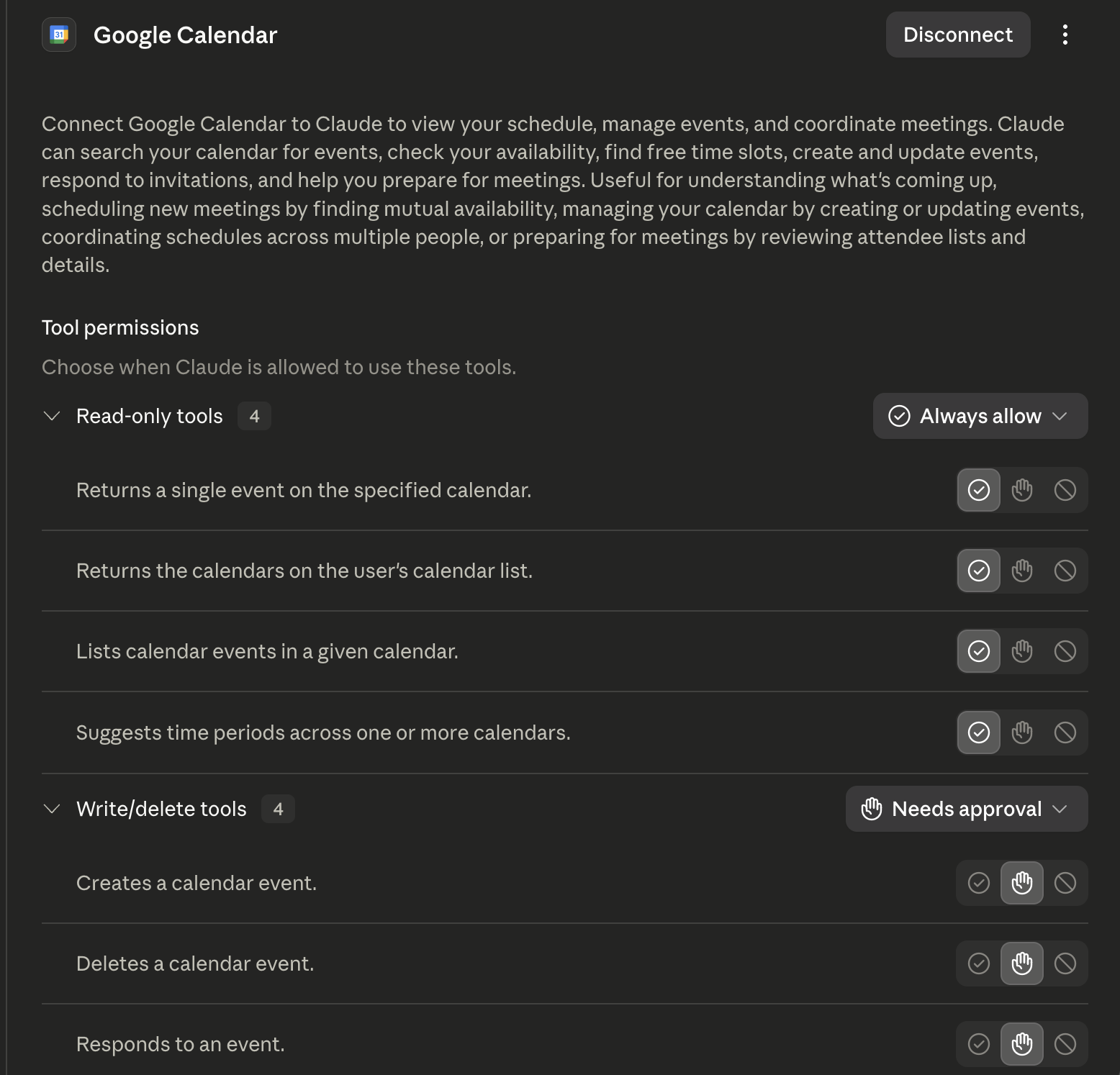
3. Configure permissions at the tool level, not the prompt level. Check the tools you're already using. Claude's routines feature, for example, lets you set read/write/delete permissions for each connected tool: always allowed, never allowed, or ask first. For destructive operations, default to ask.
4. Set platform-level spending caps. Hard limits on any billing keys the agent uses, ideally with notification alerts as you approach the cap. Overspending is its own form of destruction.
5. Practice the recovery before you need it. Walk through the actual restore path for every tool you've connected to an agent. This will help you identify any gaps in your backup plan.